Guide
Why is my Shopify store slow? 7 things to check, from a real fix
What I found on a real fashion store, what changed, and what you can check on your own store before you pay anyone.
 By Gytis Kubilius, Shopify developer6 min read
- 2-3 s
- hero photo on a slow phone, was 8+ s
- 0
- page jumps while scrolling, was 4-9
- 2.0 MB
- homepage, was 3.2 MB
- 4 days
- of work, no redesign
Short answer
Most slow Shopify stores are not slow because of Shopify. They are slow because of what loads on top of it: apps that add scripts to every page, images the theme asks for too late, and heavy first screens. On one fashion store, fixing these took the main image on a slow phone from more than 8 seconds to 2-3.
The store, and what a shopper saw
A designer fashion store on Shopify, measured on a slow phone before and after four working days.
In October 2026 I worked on nooksas.lt, a Lithuanian store selling designer fashion at discount prices. The owner put it simply: sales and reputation were suffering because the store was slow.
Before

After
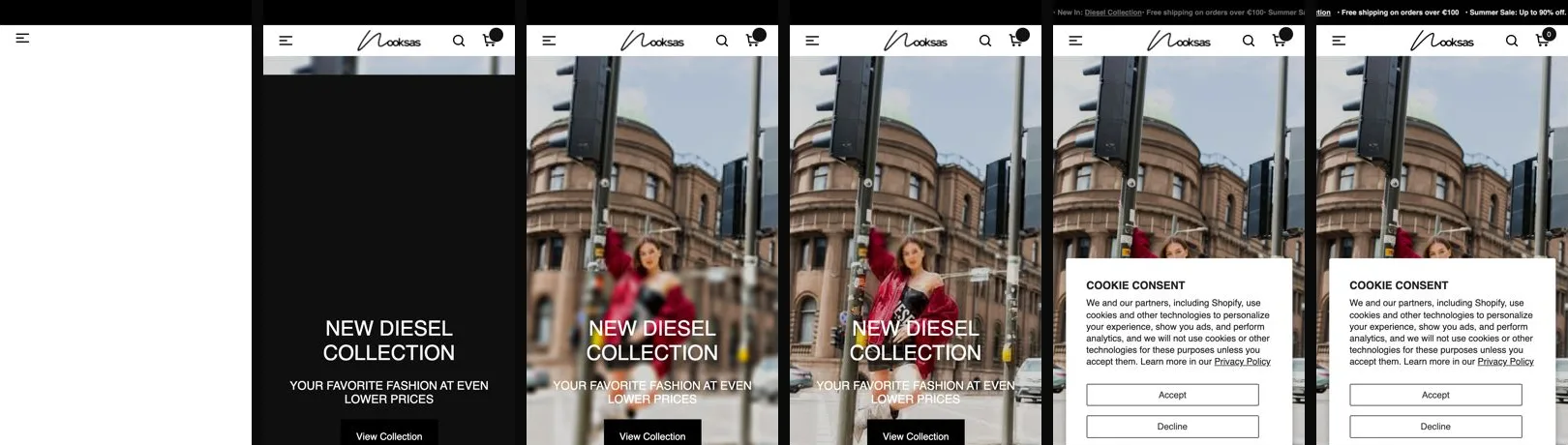
A slow store rarely looks broken. It looks empty. The header appears, then a black or grey box where the main photo should be. Product photos arrive one by one. And just as the shopper goes to tap something, the page moves. On Nooksas, all three happened on every page.
None of that shows up as a single number. It is what people feel, and it is why the PageSpeed score is the last thing I look at, not the first.
Is Shopify itself slow?
No. Shopify already handles the basics most checklists still tell you to do.
Shopify serves files from a global network (a CDN), caches pages, shrinks code and converts images to modern formats like WebP when the theme asks for them properly. So you can skip these tips when you read them elsewhere:
- “Use a CDN” and “enable caching”: Shopify does both for you.
- “Minify your code”: also done.
- “Use AMP”: it is no longer needed for search results and adds a second version of every page to maintain.
- “Get your score to 100”: a score is a lab test, not your customers. More on that in check 7.
What slows a Shopify store down is what is added on top: the theme’s own scripts, apps, and how images are asked for.
1. The first big image arrives late
The image a shopper sees first should load first, at the right size, with nothing in its way.
On Nooksas, the hero slider used a transition effect that needed an extra 560 KB image from an outside server before the photo could appear. Until it arrived, the hero stayed black. If that server was slow, it stayed black for a long time.
We switched the hero to a simple fade, told the browser to load the first slide straight away and at the size of the screen, and let the other slides wait. The photo now appears in 2-3 seconds on a slow phone.
2. Product photos wait for scripts
If photos only load after a script decides to load them, every other script on the page delays them.
Many themes load images “lazily”: a tiny placeholder first, the real photo later. That is good for photos far down the page. It is bad for the photos at the top, because the script that swaps them in has to wait its turn behind apps, tracking and chat widgets.
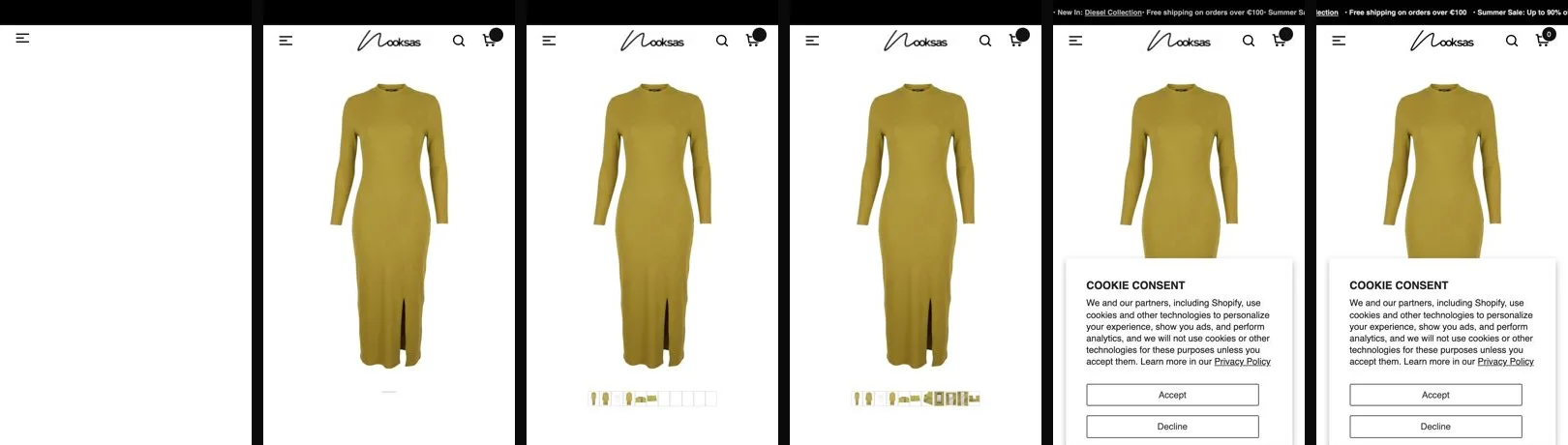
On Nooksas every image started as a 100 px placeholder, including the main product photo. We made the first photo on each product page load directly, at the size it is shown, and left the rest lazy.
Before
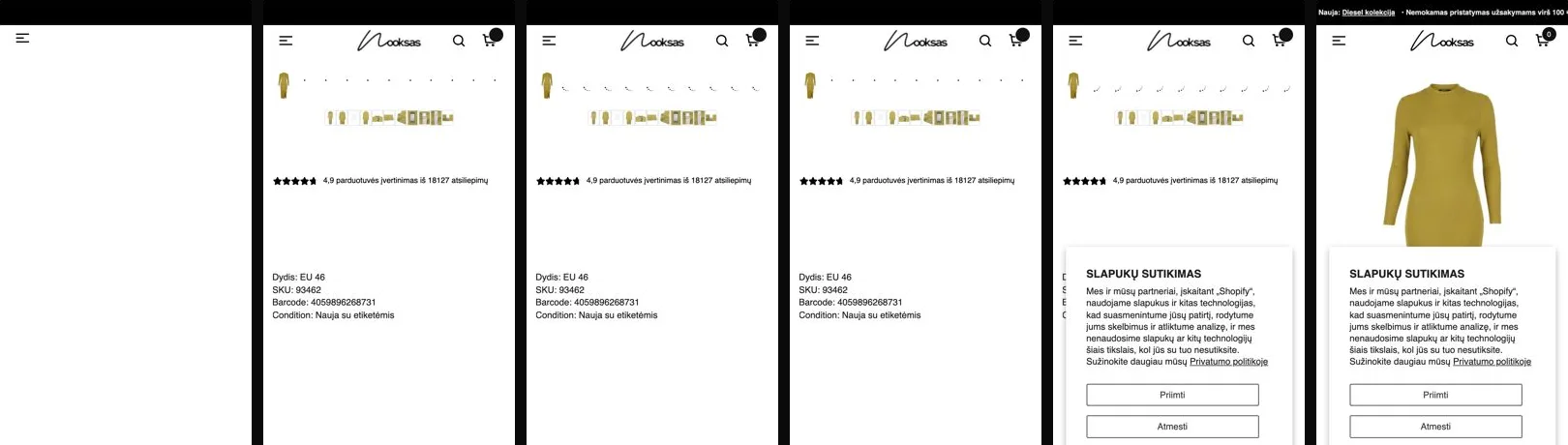
After
3. The page jumps while it loads
Every image needs its space reserved before it arrives, or the page moves when it does.
When a placeholder is 100 px tall and the real photo is 205 px, everything under it moves down when the photo lands. On a phone, that means the shopper taps the wrong thing, or loses their place.
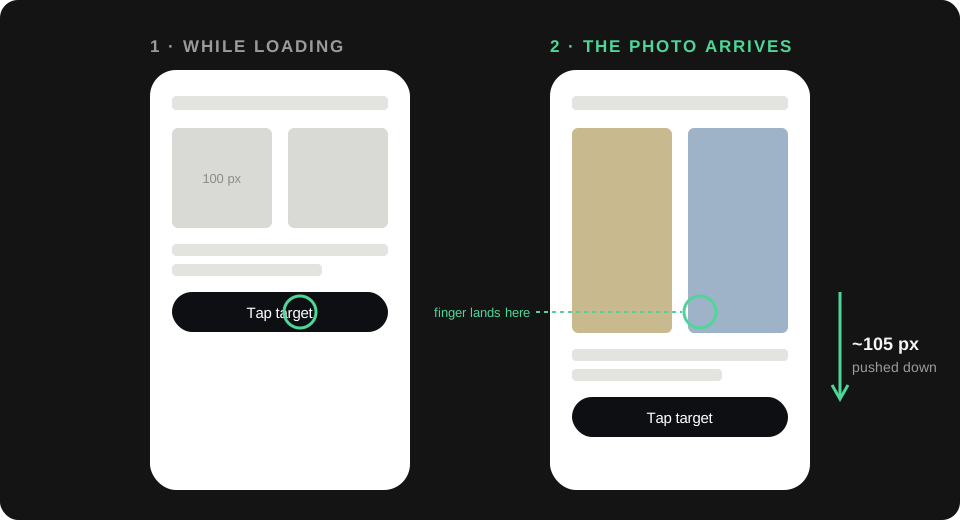
On Nooksas the product cards grew by about 105 px as photos arrived, and the product page gallery by about 460 px. A small layout rule reserved the right space from the start. Jumps while scrolling went from 4-9 per page to zero.
4. Apps load on every page, even the ones you forgot
List every app that loads on your storefront and ask whether you still use it. Then test, one at a time.
Most apps add their own scripts to every page, whether that page needs them or not. Shopify says it plainly: too many apps loading files on your storefront slows it down.
On Nooksas we went through every app with the owner. Two were switched off: a session recorder and an AI chat widget that were no longer needed. The others stayed, because the owner uses them every day.
Not every app is guilty, though. We also tested loading the email popup app later, after the page was ready. It made no measurable difference, so we left it as it was. Removing apps for the sake of a number is not the goal.
Leftover code after uninstalling
In Shopify’s own words: “Uninstalling an app doesn’t automatically remove its code from your theme.” Newer apps that plug in through app embeds usually leave nothing behind. Older apps that wrote into theme files often do, and that code keeps loading.
5. The same thing is built several times on every page
Some slowness is invisible. It is code the shopper never sees, repeated on every page.
On Nooksas the country selector was built three times on every page, each time with about 65 flag images. Together that was 297 KB, or 22% of the page’s HTML, and 65 flag downloads. Most shoppers never open it.
We now build the country list and the phone menu only when someone taps them. Flags load only when the list is open: 65 downloads became one. The homepage went from about 7,100 page elements to about 4,500.
6. The page is heavy on a phone
A phone should not download what a phone cannot use.
The Nooksas product cards showed a second photo when you hover over them. Phones cannot hover, but they were downloading those photos anyway. Now only devices with a mouse load them. Together with the image fixes, the collection page went from 3.0 MB to 2.5 MB, and the homepage from 3.2 MB to 2.0 MB.
The same thinking applies to the first screen of any store. Sliders with many slides, autoplay video and big animations cost the most exactly where the shopper is waiting.
7. You are measuring the wrong thing
Judge speed by your real visitors, in Shopify's Web performance report, not by a single PageSpeed run.
PageSpeed Insights is a lab test: one simulated phone, one run. Its score can swing a lot. On Nooksas the same page, unchanged, scored around 40 on some runs and around 88 on others. If you test once, you can talk yourself into a problem or out of one.
Shopify’s Web performance report uses real visitors to your store over the last 30 days. It rates three things as good, moderate or poor:
| What it measures | In plain words | Good |
|---|---|---|
| LCP | How long until the main image or text is on screen | 2.5 s or less |
| INP | How fast the page responds to a tap | 200 ms or less |
| CLS | How much the page jumps while loading | 0.1 or less |
What happened to the Shopify speed score?
Shopify retired its speed score, the number out of 100 in the admin, on 31 January 2024. The Web performance report replaced it. If an article still tells you to raise your Shopify speed score, it is out of date.
The results on Nooksas
Same store, same tests, before and after four working days. Visitor-facing numbers first, the score last.
- Hero photo on screen, slow phone
8+ s2-3 s - Main product photo on a slow phone
8 s2 s - Page jumps while scrolling
4-90 - Homepage weight
3.2 MB2.0 MB
| Measure | Before | After |
|---|---|---|
| Collection page weight | 3.0 MB | 2.5 MB |
| Time the phone is too busy to respond (collection page) | 330 ms | 124 ms |
| Page elements on the homepage | 7,094 | 4,460 |
| PageSpeed mobile, median | 43 (4 runs) | 86 (10 runs) |
| PageSpeed desktop, median | 70.5 | 96 |
What did not help: loading the email popup app later. Tested, no measurable gain, not applied.
When to bring in a developer
Checks 1, 4, 6 and 7 you can do yourself. Checks 2, 3 and 5 live in the theme's code.
You can look, count, switch off what you do not use, and watch the Web performance report on your own.
How images are asked for, how space is reserved, and what is built on every page live in the theme’s code. That is where a developer earns their fee, and where a speed app cannot reach, because it cannot change how your theme loads.
A good speed fix starts by measuring, changes the theme on a copy, tests it on real phones, and only then goes live. If someone promises you a score before they have looked, be careful.
Questions
Short answers to what store owners ask most about speed.
How many apps is too many on Shopify?
There is no safe number. One app that loads a heavy script on every page can cost more than five that load only where they are used. Look at what each app adds, not how many you have.
Does uninstalling a Shopify app remove its code?
Not always. Shopify says uninstalling does not automatically remove an app's code from your theme. Apps that use app embeds usually clean up after themselves; older apps that edited theme files often leave code behind.
What is a good PageSpeed score for a Shopify store?
There is no score that guarantees a fast store, and the same page can score very differently from one run to the next. Aim for "good" on LCP, INP and CLS in Shopify's Web performance report, which is based on your real visitors.
Is my store slower on mobile than desktop?
Almost always. Phones have slower processors and often slower connections, so the same page that feels instant on a laptop can take several seconds on a phone. Test on a phone, on mobile data.
Does store speed affect Google rankings?
A little. Google uses real-visitor Core Web Vitals as one signal among many. The bigger cost of a slow store is the shoppers who leave before the page is ready.